Schedules · Kids · Small groups · Finance

Someone declined the schedule at 10 PM on Saturday.By Sunday morning it was already solved.

Schedule · next weekDemo church · Thursday service
Volunteer schedule by ministry and by service, showing confirmations coming in and the automatic replacement: a volunteer declines and the system invites the next candidate in line.
MinistryTHU · 8 PMThursday Service
WorshipTiago, awaiting reply
MediaBruno, awaiting reply
KidsSara, awaiting reply
GreetersMarcos, awaiting reply

This week's schedule is published. Volunteers confirm from their phones.

Cascading replacement is a product feature, not an animation: whoever declines frees the slot, the next candidate is invited with a deadline and the leader only gets the outcome.

IDE Escalas invites the next volunteer in line on its own, with a deadline, and only tells the leader the result. It's the same system that runs service check-in, protects kids ministry drop-off and pickup, organizes small groups and receives the offering via PIX.

14 days free with everything · no credit card · cancel anytime

How it works

A week of church, from start to finish.

It's not a feature list. It's the order in which things happen at your church — and what the system does at each one.

  1. THU
  2. FRI·SAT
  3. SUN
  4. MON

Thursday

The whole week's schedule, on a single screen.

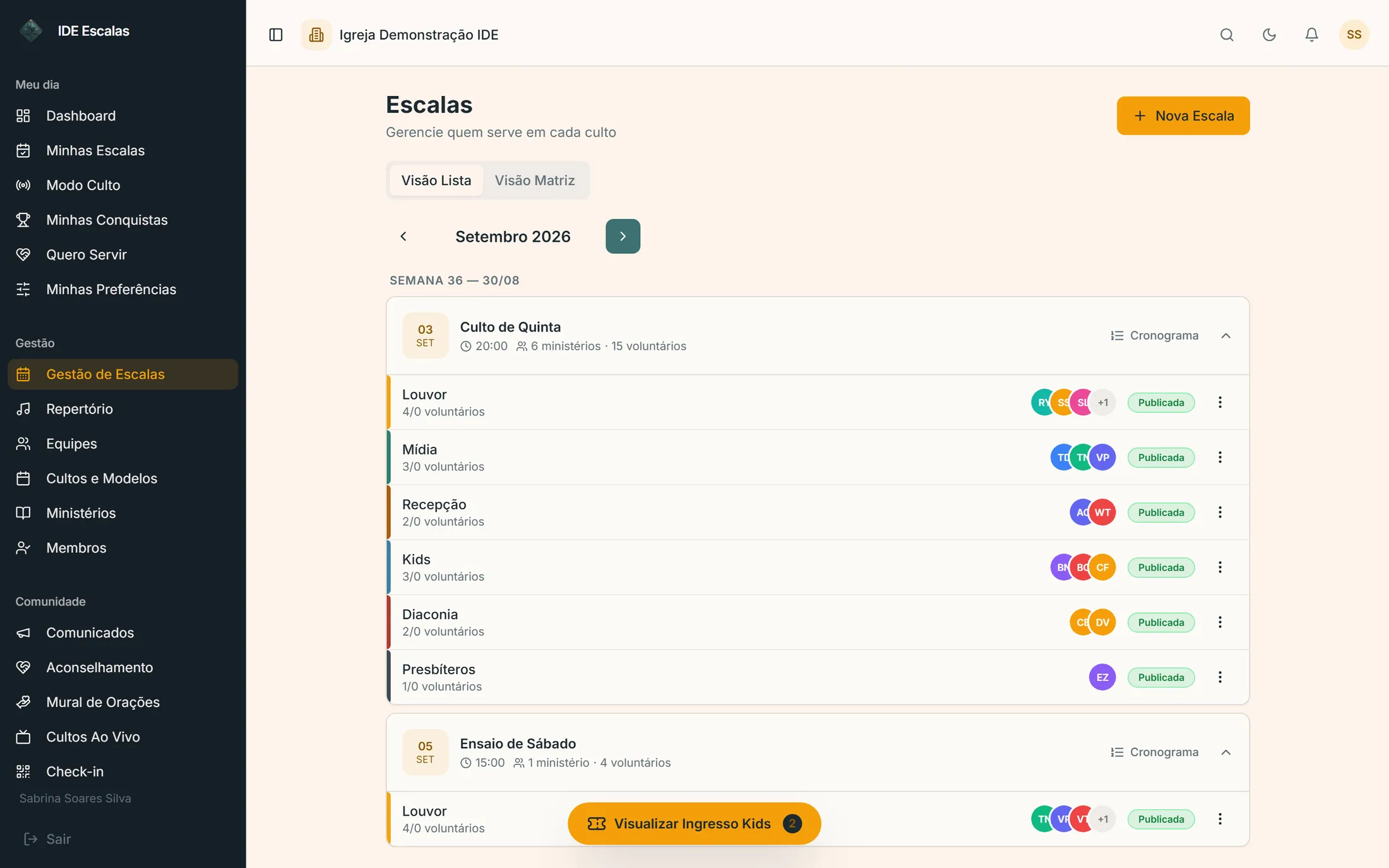
Leadership schedules every service and every ministry on the same grid — and the system already knows who's traveling, who asked for time off and who served last Sunday.

Matrix view

Ministries in rows, services in columns. Batch scheduling, without leaving the screen.

Volunteer availability

Each person blocks out the dates they can't serve. Whoever is unavailable doesn't even show up to be scheduled.

Setlist with keys

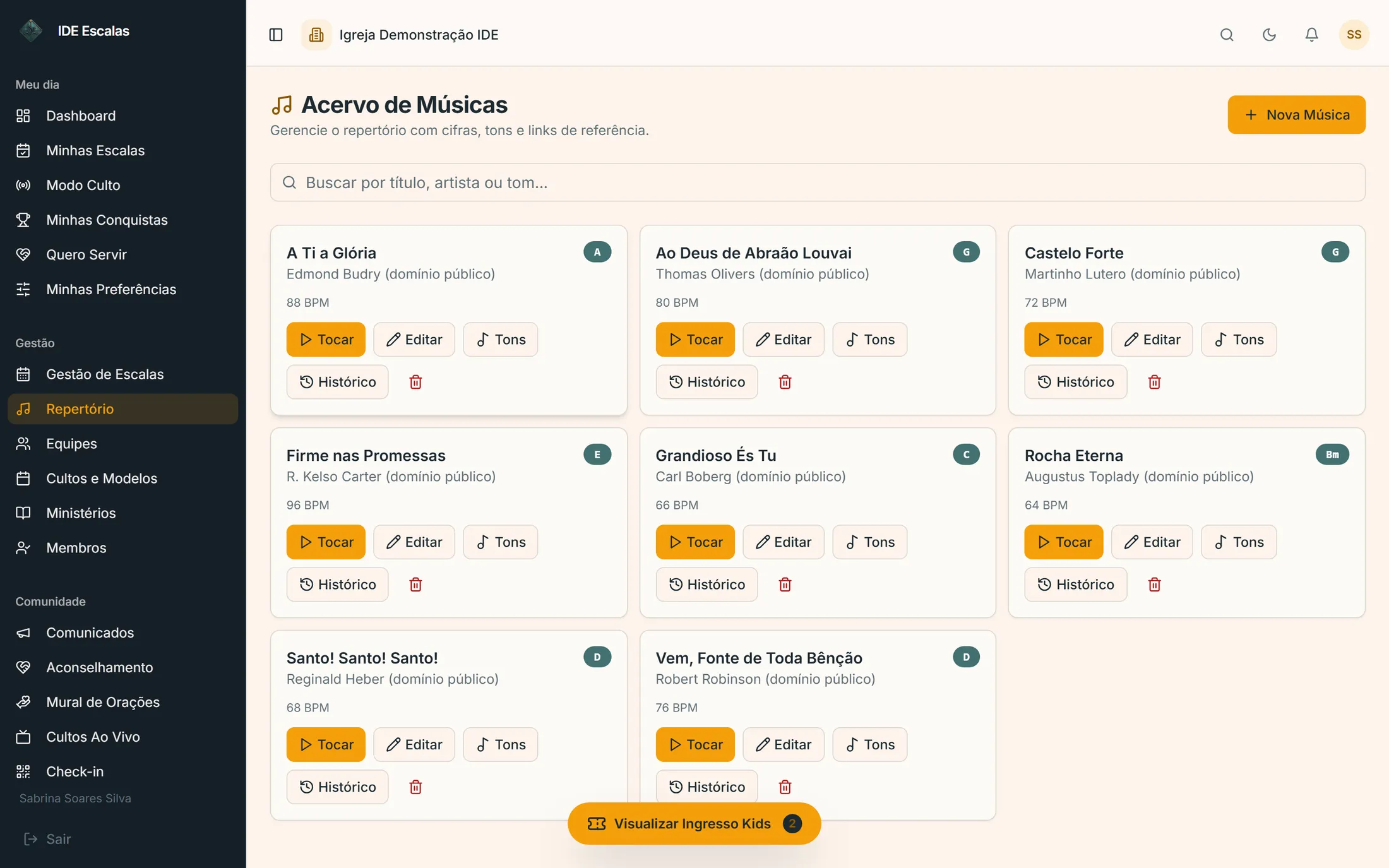
Setlist with the key of every song and who leads it. The key comes from the library in its canonical form — G#m is G#m on every screen.
  • Schedule templates
  • Order of service by duration
  • Song library
  • Multi-campus scheduling
app.ideescalas.com/escalas
IDE Escalas schedules screen with the coming weeks' services, each ministry and the volunteers already confirmed
swipe the screen sideways →
app.ideescalas.com/repertorio
IDE Escalas song library, with the key and BPM of every song in the repertoire
swipe the screen sideways →
  1. THU
  2. FRI·SAT
  3. SUN
  4. MON

Friday and Saturday

The part that wears the leader down happens without them.

Once you publish the schedule, the system takes over: it notifies, follows up, receives the decline and solves it. The leader is only told when there's a decision — not when there's movement.

One-tap confirmation

Volunteers reply right from the notification. No WhatsApp group, no list of who still hasn't answered.

Automatic cascading replacement

Declined? The system invites the next in line, with a deadline. If that one declines too, it calls the next — until the slot is filled.

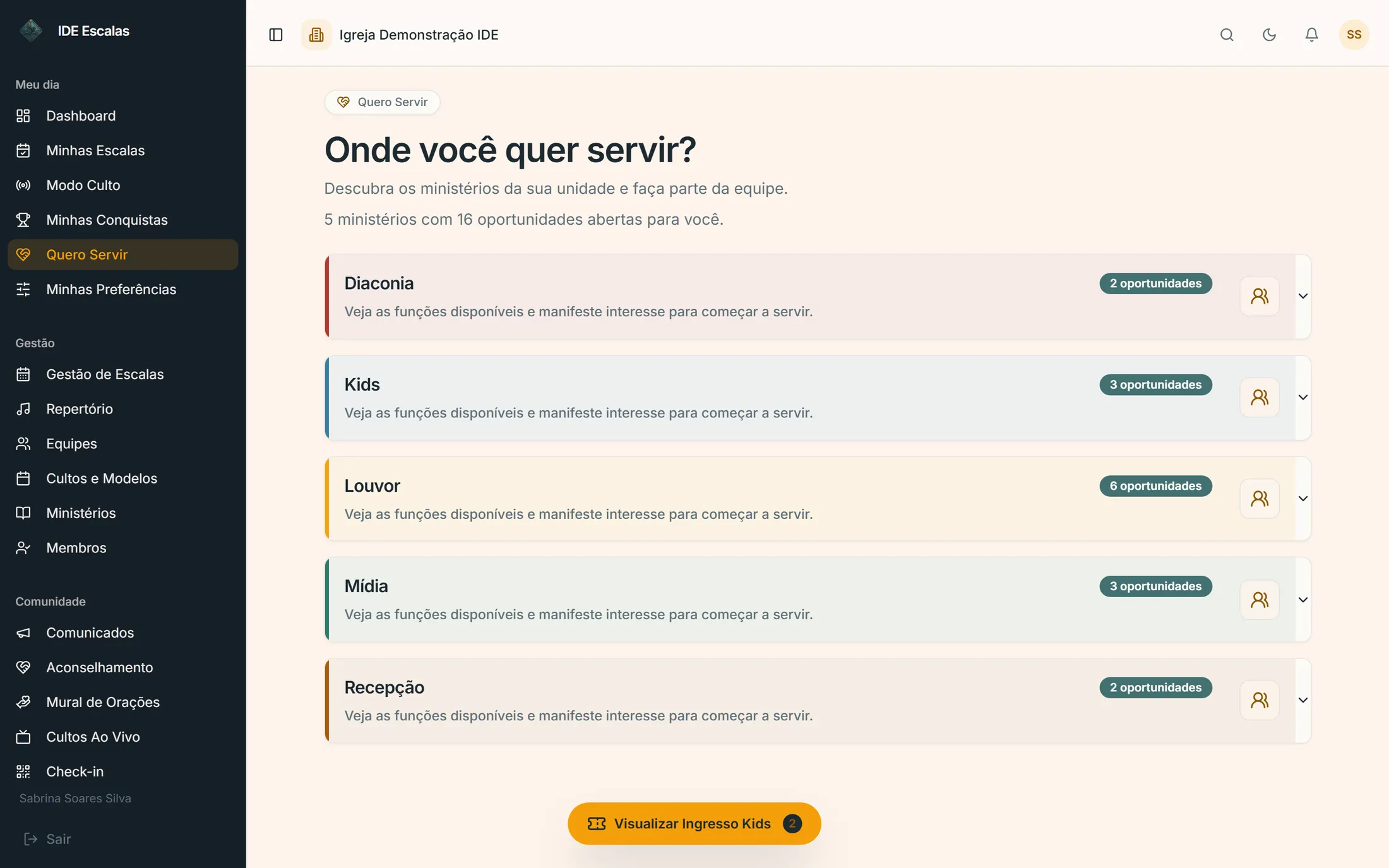
I Want to Serve board

Members volunteer instead of waiting for an invitation. Each ministry decides whether it appears on the board — the ones that recruit by referral stay off it.
  • Announcements by ministry
  • 3-day and 1-day reminders
  • Push on the phone
  • Swaps between volunteers
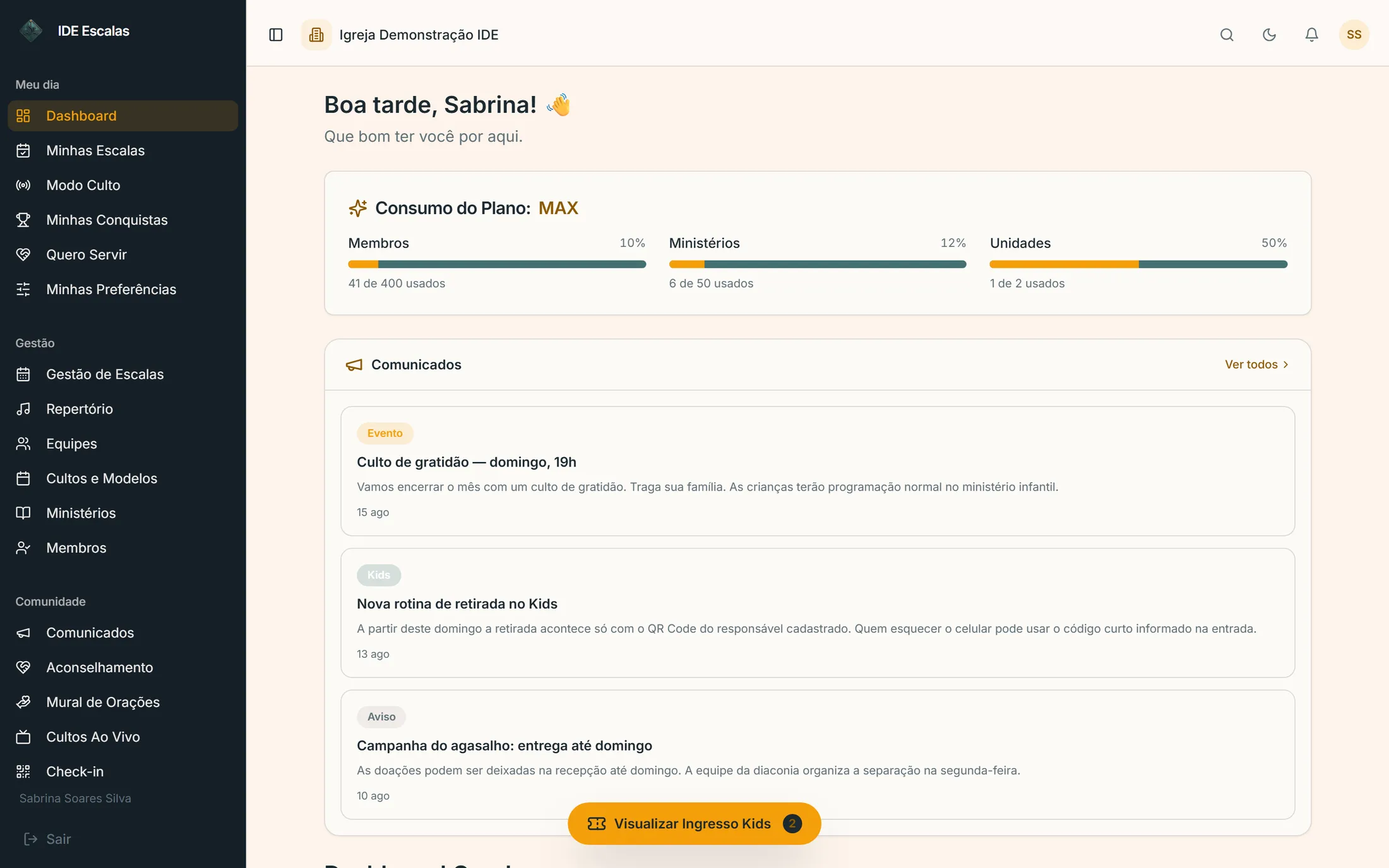
app.ideescalas.com/dashboard
IDE Escalas dashboard with schedules at risk, pending confirmations and the notice of a volunteer who declined
swipe the screen sideways →
app.ideescalas.com/quero-servir
IDE Escalas I Want to Serve board, with the ministries accepting applications and the number of open slots in each
swipe the screen sideways →
  1. THU
  2. FRI·SAT
  3. SUN
  4. MON

Sunday

From the gate to the kids' room.

On service day the system leaves the dashboard and goes to the door, to the Kids room and into the hands of whoever runs the order of service.

QR code check-in

Members check in through the app; guests get a secure link. The greeters know who arrived, with no line.

Kids: check-in, room and pickup

A child only leaves with whoever shows the guardian's QR code. Camera failed? There's a short code — the line doesn't stall over a smudged lens.

Service mode

The order of service on the screen of whoever is leading, with the clock running and the next step always in view.
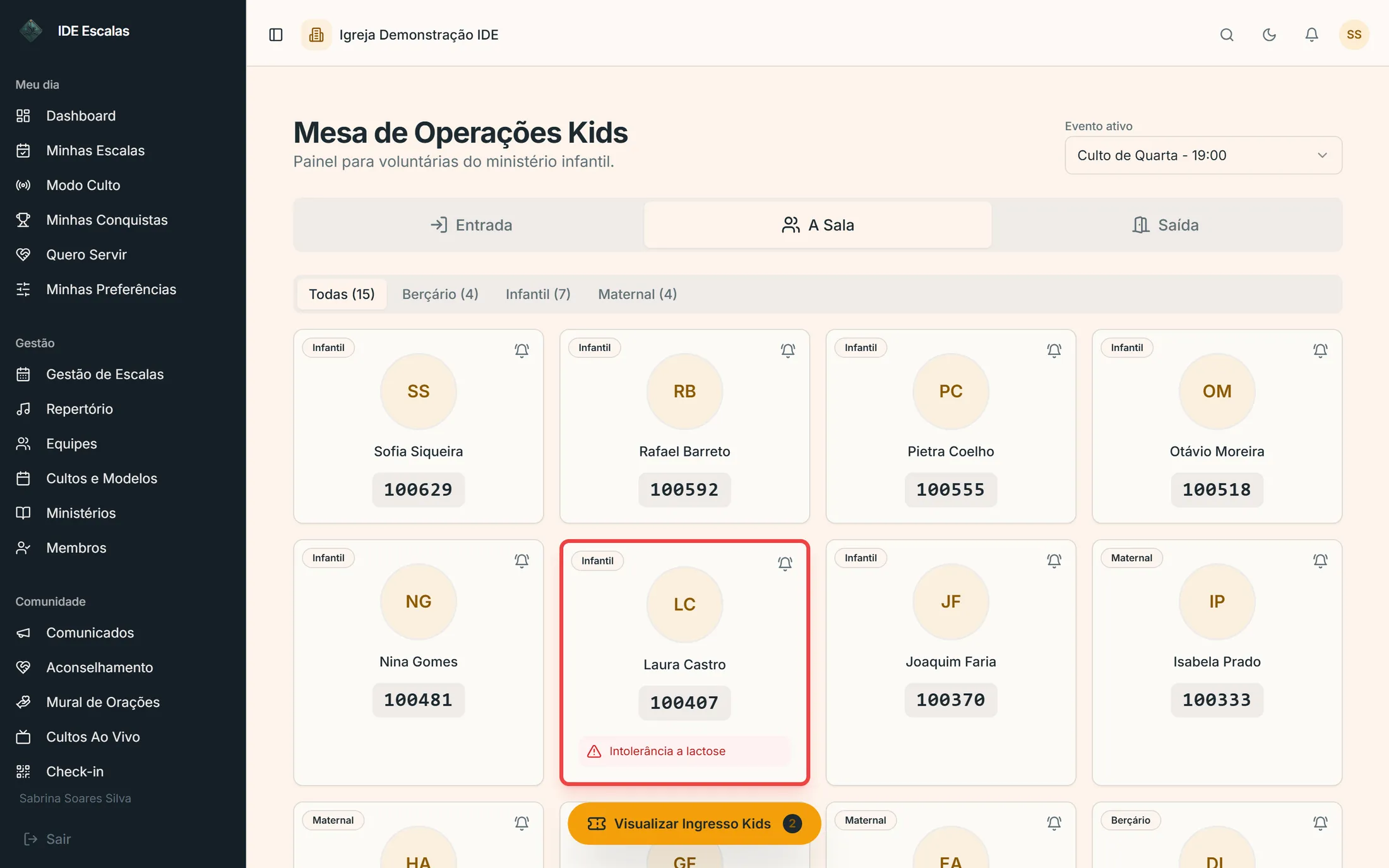
  • Teacher alert to parents
  • Food restriction highlighted
  • Digital ticket
  • Headcount per room
app.ideescalas.com/kids-operacao
IDE Escalas Kids Operations Desk showing the children by room, each one's short pickup code and a highlighted food-restriction alert
swipe the screen sideways →
IDE Escalasnow

The live stream has started.

Tap to watch.

IDE Demo Church
Live
Sunday Service · 7 PM
Tithes and offerings

Building renovation

Illustration of the church's public live stream page.

For those who aren't in the building

Church happens outside the building too.

The member who's traveling, the sister on bed rest and the guest who hasn't walked through the door yet all arrive through the same place: your church's address on the internet, with the live stream and the offering on the same screen.

The church website, live
Each campus gets its own web address, with events, ministries, prayer requests and giving. Set up on one screen, with no developer and no separate hosting.
Live stream inside the app
Register the church's YouTube channel. When the live stream goes on air, whoever has the app gets the notification and watches without hunting for the link in the group.
Offering on the same screen
PIX or card right below the video, per campaign and with the goal in sight. The money lands in the church's account — IDE Escalas doesn't keep any of it.
  1. THU
  2. FRI·SAT
  3. SUN
  4. MON

Monday

What Sunday revealed becomes pastoral care.

Who visited for the first time, who stopped showing up, who asked for prayer. The system gathers it all and hands it back as a task, not as a report.

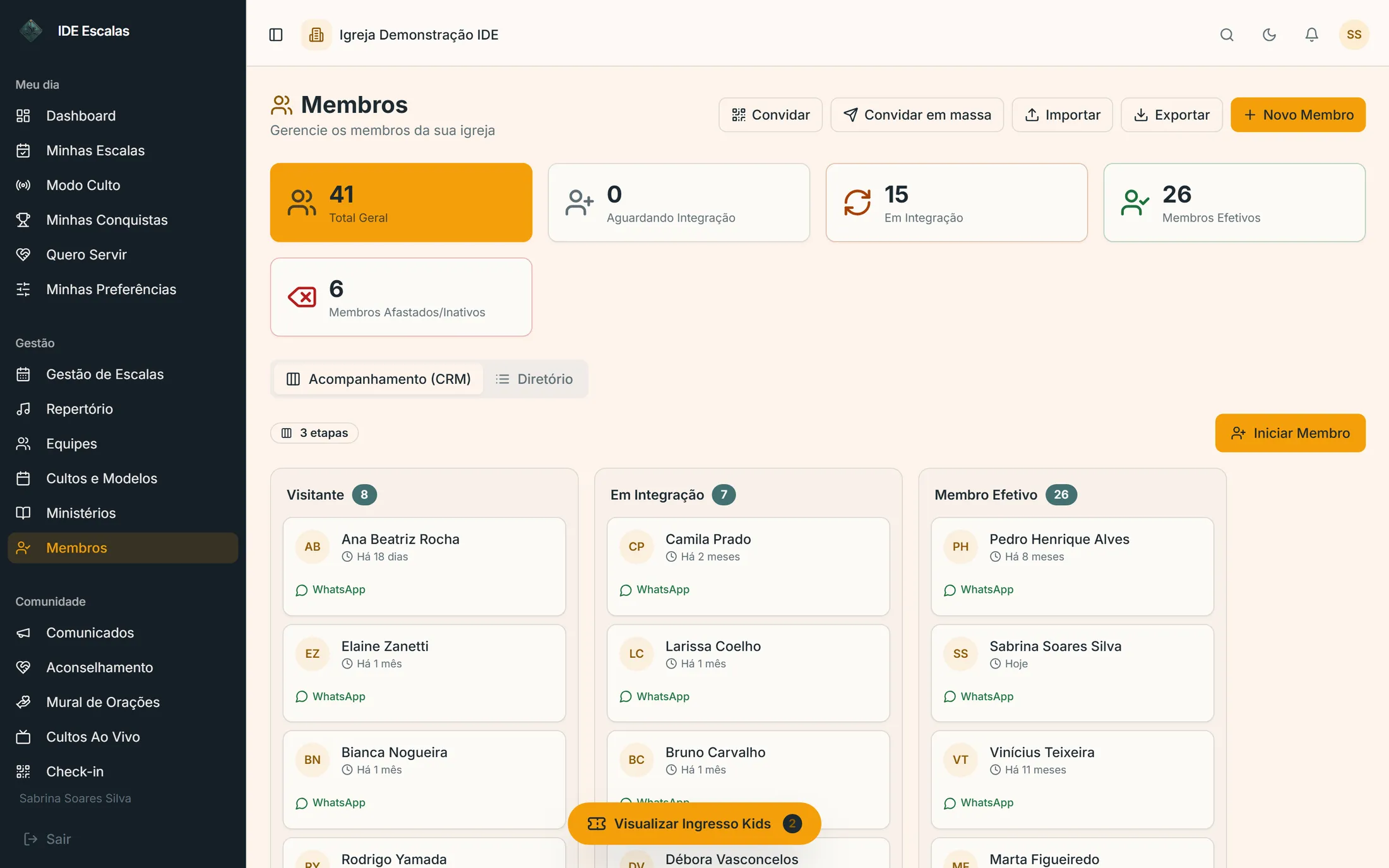
Member journey

A funnel from guest to baptized member — which also decides who can already be scheduled. Caring and serving stop being two separate records.

Small groups and Sunday school classes

Attendance by list, not just by QR: whoever doesn't have a phone still gets counted. A meeting that didn't happen has a reason, so a break doesn't turn into an alert.

Pastoral care

Scheduling with the team the church defines. Whoever meets with people is whoever was assigned — not whoever holds an admin role.
  • Prayer wall
  • Fundraising campaigns
  • Attendance report
  • Volunteer achievements
app.ideescalas.com/membros
IDE Escalas membership funnel as a kanban, with the columns Guest, Being Integrated and Full Member
swipe the screen sideways →
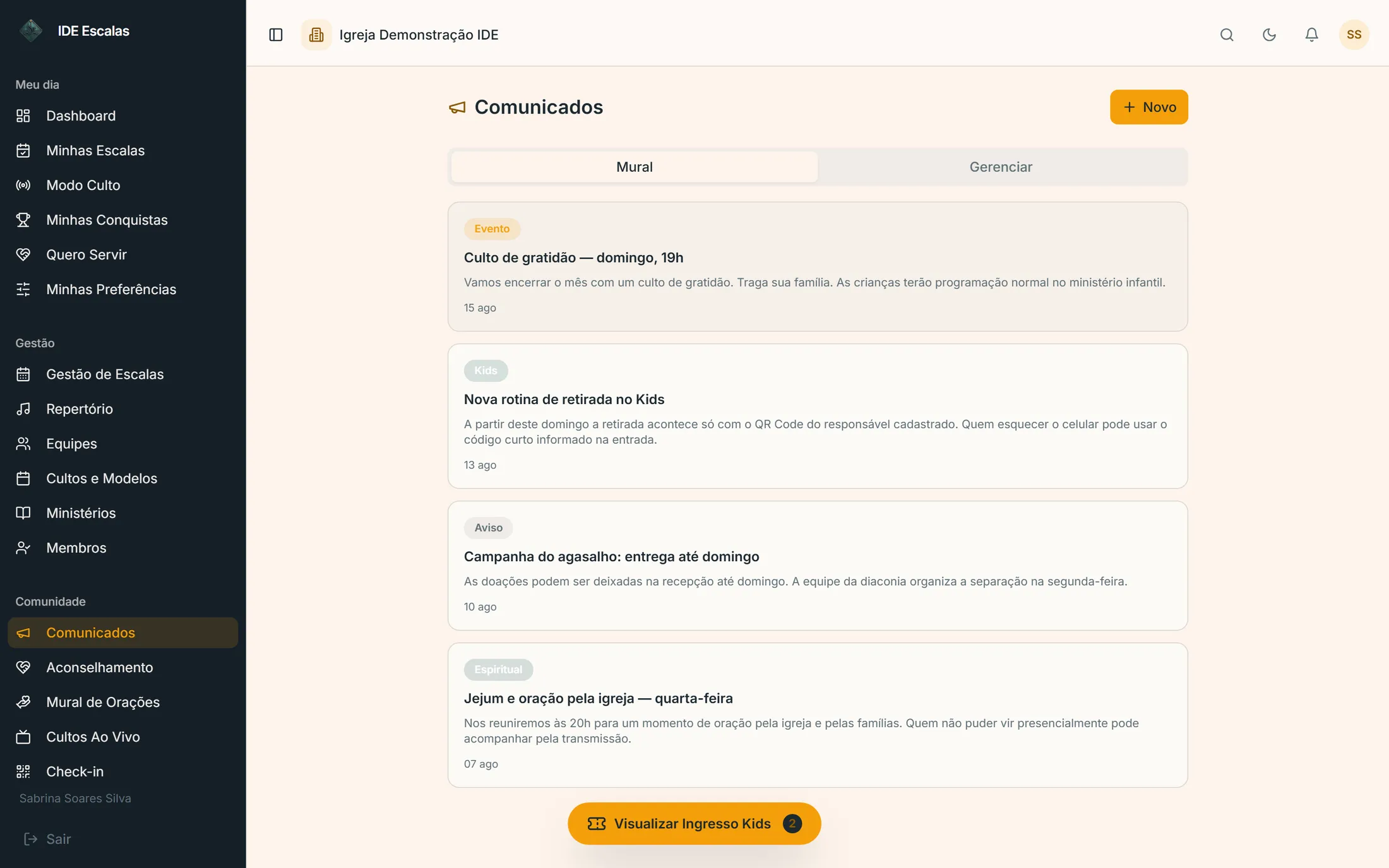
app.ideescalas.com/comunicados
IDE Escalas announcements board, with notices sorted by category
swipe the screen sideways →
Security and LGPD

You're going to put the member list, the kids' schedule and the offering in here.

So it's fair to know exactly what protects each of those things. No badges and no vague promises — just what the system does.

  • Your church's data never mixes with another's

    Every database query is filtered by the church of whoever is asking — and, when there's more than one campus, by the campus too. It's not a setting someone can forget to turn on: it's how the system reads data.

  • A child only leaves with whoever has the guardian's QR code

    Pickup requires the registered guardian's code. If the camera fails, there's a short fallback code — because a lock that jams in the middle of the service becomes a lock somebody turns off.

  • What's discussed with the pastor is encrypted

    Pastoral care notes are stored encrypted, with a key separate from the rest of the system, and every access is logged. Not even whoever administers the church in the system reads what isn't theirs to read.

  • Sessions that expire, passwords that never travel in the clear

    Access is renewed by a rotating token, stored in the database only as a fingerprint. Changed someone's role on the team? The new permission takes effect in minutes, with no logout needed.

  • Every sensitive action is logged

    Who changed it, when and from where. And routes that carry passwords or personal data have their content masked in the audit trail itself — the log exists to investigate, not to become a second sensitive database.

  • The church owns the account, and can leave

    Ownership can be transferred to another leader, and closing the account has a grace period before any permanent deletion — real time to reconsider or take your data with you. Nothing is erased by surprise.

The full details — which data we collect, for how long and with whom it's shared — are in the Privacy Policy.

Plans

The price follows the size of the church.

Free forever for up to 10 volunteers — and every signup starts with fourteen days of everything unlocked, no credit card. No lock-in: cancelling is a button in the dashboard.

Free forever

Free forever. Manual scheduling, setlists and the volunteer app. Up to 10 volunteers and 2 ministries, with no expiration — and the fourteen-day trial comes first, with everything unlocked.

Create free account

Escalas 30

Up to 30 volunteers
$15.20/month
billed yearly

For the church that just needs to stop building schedules on WhatsApp.

  • Unlimited ministries, services and schedules
  • Automatic generation and cascading replacement
  • Song library with chord charts and Service Mode
  • Announcements in the volunteer app
  • WhatsApp for those without the app
Start free

Escalas 100

Most popular
Up to 100 volunteers
$31.20/month
billed yearly

The point where every ministry's schedule fits on a single screen.

  • Everything in Escalas 30
  • Matrix view of all ministries
  • Larger WhatsApp allowance
Start free

Escalas 300

Up to 300 volunteers
$55.20/month
billed yearly

Big structure, simple operation.

  • Everything in Escalas 100
  • WhatsApp allowance for large teams
  • Priority support
Start free
Not sure? The two lines, side by side
What the church getsSchedules OnlyFull Management
Schedules with automatic generation and cascading replacementIncludedIncluded
Setlists, chord charts and Service ModeIncludedIncluded
Announcements in the volunteer appIncludedIncluded
Push and WhatsApp remindersIncludedIncluded
Members, journey and automationsNot includedIncluded
Kids check-in with the guardian's QR codeNot includedIncluded
Small groups, Sunday school and prayer wallNot includedIncluded
Finance and PIX givingNot includedIncluded
Public website and live serviceNot includedIncluded
Campuses1Multi

More than 1,000 members? Talk to the team about the Enterprise plan.

Questions

What leadership asks before deciding.

No. The member list comes in through a bulk invite — you send the link, each person completes their own registration, and the church ends up with up-to-date data instead of last year's spreadsheet. The WhatsApp group keeps existing for conversation; what leaves it is chasing confirmations, which becomes automatic.

The first schedule is published the same day. What takes longer is registering members, and that happens in parallel — invites get accepted while leadership is already using the system. Onboarding creates the main campus, the access roles and the default journey automatically the moment the church is created.

The system doesn't depend on everyone joining at once. Whoever installed the app confirms from their phone; whoever didn't keeps getting scheduled and, on paid plans, receives the reminders on WhatsApp — only the confirmation goes through the app. Small group attendance follows the same principle: there's a list, not just a QR code — whoever doesn't have a phone still gets counted as a member, not as a guest.

Yes, and it's not a setting someone can forget to turn on: every database query is filtered by the church of whoever is asking, and by campus when there's more than one. No screen in the system has any way to list another church's data.

Support is on WhatsApp, with people from the team on the other end. You talk to someone who knows the product, not to a ticket form.

The screen volunteers use most has one question and two buttons: can you serve on Sunday, yes or no. They answer right from the notification, without opening the app. It's deliberately less than WhatsApp already asks of them.

We don't charge anything extra for the finance module. Only the payment gateway's operating fees apply to PIX and card transactions, and the payout goes straight to the church's account.

There's no lock-in and no penalty: you cancel from the dashboard. Closing the account has a grace period before any permanent deletion, so there's real time to reconsider or take your data with you. And ownership can be transferred to another leader without recreating the church.

None. Leadership uses the browser, on any computer or tablet, and members use the app on their phones — available for Android and iPhone.
Start with the next schedule

Fourteen days is time enough to live through two whole Sundays.

Build the schedule on Thursday, watch the confirmations come in and let the system handle the first decline. By the second Sunday, the week's schedule builds itself — and if it's not worth it, all you did was organize two weeks.

I'd rather ask questions on WhatsApp first

14 days free with everything · no credit card · cancel anytime